How to Edit Assets
Editing lets you take any asset you’ve already generated in Gametank and make small, controlled changes—without rebuilding from scratch. It’s ideal for tightening details, nudging a pose, adjusting colors/materials, or producing a few on-style variations of something that’s close to perfect.
Good to know
- Edits work only on assets created with Gametank (open one from My Assets, then choose Edit).
- Credit cost: Medium Edit = 2 credits · High Quality Edit = 5 credits.
- Outputs respect your project framing (transparent PNGs when your workflow calls for it).
When to use Editing
Use Editing when you want to:
- Correct or refine: fix a minor artifact, clean up edges, slightly adjust lighting/shadows.
- Small pose/position tweaks: tilt a head, lift an arm, rotate an item, shift a prop.
- Style-true variations: produce a few alternates that keep the same look (genre, art style, palette, perspective).
- Palette/material adjustments: darker armor, brighter UI accent, subtle hue shifts.
- Add/remove small details: straps, trims, decals, pockets, simple FX accents.
Avoid Editing for:
- Large structural changes in one step (e.g., full outfit swap + new pose + new camera).
- Exact text/typography or pixel-perfect symbols.
- Perfectly rigid geometry or strict counting/symmetry (multiple tiny identical elements).
Tip: Big changes are possible—just break them into small passes (pose first, then color, then accessories), checking results between each pass.
Step-by-step: Edit an existing asset
-
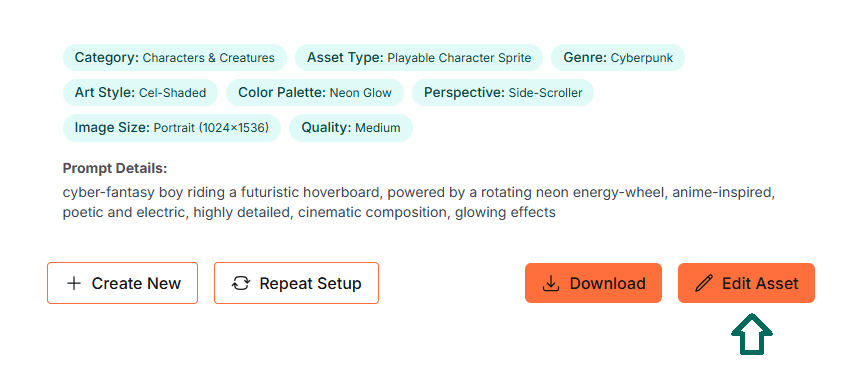
Open the asset
- Go to My Assets or the result you just generated.
- Click Edit Asset.
-
Describe only the change
- Keep the request focused on what should change, not everything about the image.
- Keep what you like by saying you want to maintain the same character/subject, style, and framing.
-
Choose quality
- Medium (2 credits) for fast iteration and most tweaks.
- HQ (5 credits) for maximum surface fidelity (disabled on trial).
-
Generate & review
- Check that the identity, palette, proportions, and framing stayed consistent.
- If something drifted, run one more pass with a stricter instruction (see Best Practices below).
-
Download or edit again
- Chain a second small edit if needed (e.g., pose first → color next).
- Export when you’re happy.
Best practices for clean, consistent edits
1) Change one thing at a time Ask for a single adjustment (e.g., a small pose nudge or a color tweak). This keeps identity and style locked.
2) Preserve what matters Include a short note like “keep the same character, style, palette, and framing” so the edit focuses on your change.
3) Prefer small pose deltas For animation-friendly outputs, use incremental pose adjustments across multiple edits rather than a big jump.
4) Mind the framing If you ever see cropping or edge drift, mention that you want the same canvas and padding as the original.
5) Choose quality intentionally
- Medium is usually best for exploration and pixel art iteration.
- HQ is great when you need the most faithful surface/detail on top of the same structure.
6) Iterate in passes For larger goals, do multiple quick edits: pose → accessory → color/material → minor FX.
What works well (ideas to try)
- Color/material passes: darken leather, brighten metal, shift a UI accent color.
- Pose polish: slight head turn, hand angle change, raise/lower an arm.
- Detail layering: add a strap, patch, small emblem, subtle glow.
- Style-true variants: alternate trims, secondary palette, different minor accessory.
FAQ
Does editing keep my style and subject consistent? Yes—especially when you phrase the edit as a small change and remind the system to keep identity, style, and framing intact.
Can I make multiple edits in a row? Absolutely. It’s often better to chain small edits than try to do everything in one pass.
What about transparent backgrounds? If your original asset used a transparent background, edits will preserve that (per your workflow settings).
How many credits do edits use? Medium Edit = 2 credits; HQ Edit = 5 credits (trial users: Medium only).
Next steps
Ready to refine an existing asset or spin up a style-true variant?